- Software
- IQANdesign
-
 Questions

0
ISO 17215 Setup
I am trying to setup some cameras that have ISO 17215 abilities, but I can not get them to show up on the display.
I can assign the mac to a camera, but that is about all.
I can not find any documents on how to setup 17215 cameras, and when I tried to wire shark a SV camera, I could not see any of the ISO messages.
I am able to stream the cameras over RSTP so I know the camera and streams are working.
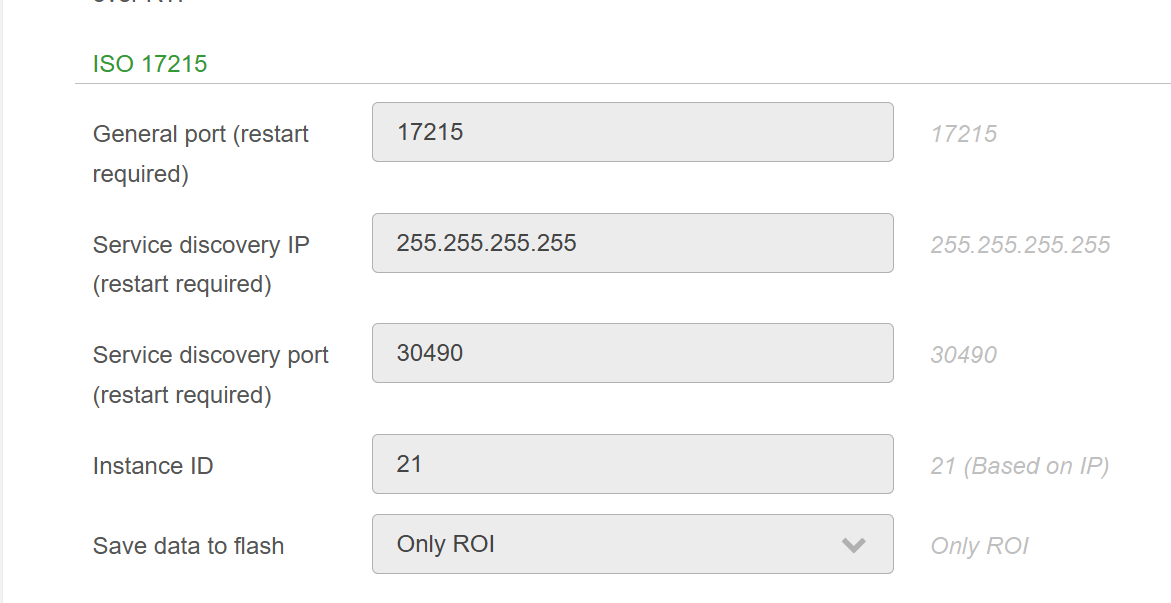
These are the settings in the camera, and the IP is set to DHCP, can anyone confirm this is correct?
Customer support service by UserEcho

ISO.pdf
Here is what the camera mfg sent me for there iso feature set. How do I get any info from Parker to get this setup correctly? As I can not find any documents on this from you guys???
This was already answered off-forum, but for anyone reading here:
Yes, IP address needs to be via DHCP
There is an important points currently (7.06) missing in the IQANdesign user manual. The SOME/IP camera services port needs to set to 8001. Example print screen from Ark Vision camera configuration: