- Software
- IQANdesign
-
 Questions

How to use PCC (PIN) to make display pages accessible or hidden
Hi,
I have a app (IQAN 6.08.32) which has a a VDIN button that is supposed to make the PIN dialog popup, and if successful (valid PIN is entered) then make certain display pages accessible to a user depending on their access level. It has worked up until now when I had to make logic changes as the PIN channel was being reset preventing the ability to make adjustments using IQANrun. This in turn has broken the apps display page navigation.
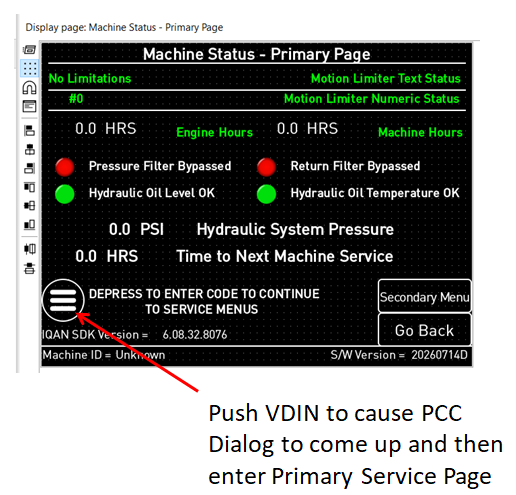
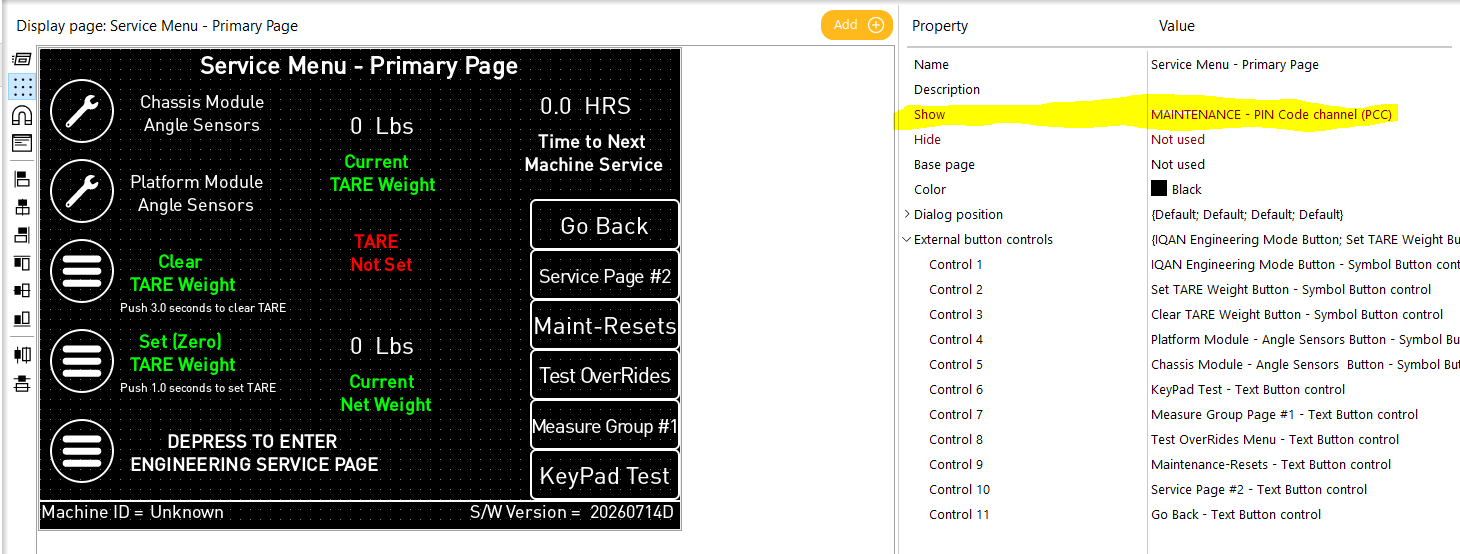
I have tried several things and none seem to work. Now, since the change detailed above, when the Service Menu button is depressed, shown below in first screensnip, the app just switches to the Primary - Service Page, screensnip #2, even though it is not supposed to show unless the PCC channel is TRUE. I have checked it and it is FALSE. It seems like one can not control whether a display page is shown using a PCC (PIN), even though I have the Show control for that page set to use the PIN . Has anyone been successful in doing this, or is this a bug?
Customer support service by UserEcho

That 'Show' property is a spot for you to enter a signal to have a page show from an internal command instead of a button on a display page, it does not control whether a page has the capability to be shown, it also works on a leading edge basis, along with the hide property, so they will only hide/show the page once upon the initiation of the signal attached, not constantly so long as the signal is true.
From my understanding, the button on your primary page is both bringing the PCC dialog up, as well as commanding a 'primary service page'? My guess is that the PCC turns true for a single cycle when told to show, so attaching an IDC activated by the PCC with a short delay on that in turn activates the show page may fix the issue?
pcc page show example.idsx
here's something that seems to work?
Leighton,
Thanks very much for your suggestions as well as the IDSX file. It's seems to be an answer for my issue(s). I had implemented changes per your post, so had most of it working, except could not re-enter the PIN protected page if I had exited it. I was getting a "PIN already entered" dialog box/message.. I had created some logic similar to that which is in the IDSX file you sent but it was not behaving very well. When PCC was already entered/valid, you'd have to depress the VDIN 3-4X before it would switch to the PIN protected page . With your approach one only has to depress the VDIN twice to switch to PIN protected page, if PIN has already been entered and is valid. I've looked tried several things to eliminate having to depress the VDIN twice but don't see a way around this "nuisance" behavior. It is what it is.
The information you provided me on how the Show property works was probably the biggest clue. I was going at this wrong, based on behavior from how Hydac touchscreens work (Am using a Hydac Vision 307 with SDK = CodeSys in conjunction with IQAN MC43's on a different project). I am using touch VDIN's to switch directly between display pages on it, no problem. Too bad IQAN doesn't recognize a touch VDIN to do the same.
Thanks again,
Mark
does it still do it if you try it like this?
HI Leighton,
When I saw when you [proposed, I thought it would fix it, since it's using edge triggering. However, it doesn't seem to make a difference. Still need two VDIN button pushes to bring up the PIN protected display page, if PIN has already been entered/validated.
No worries. My client will be happy with this, even though it's a behavioral nuisance. I'll just tell him it's not a bug, it's a "feature" to make sure you really want to get back into the protected display pages. :)
Thank you,
Mark