+2

IQANdesign 4.01 released

Gustav Widén (System support) 10 years ago in IQANdesign updated 10 years ago 0

Highlighted updates

New gateway module IQAN-G11 added

The IQAN CAN bus to bluetooth dongle IQAN-G11 added in IQANdesign. More information will follow when hardware and apps are released.
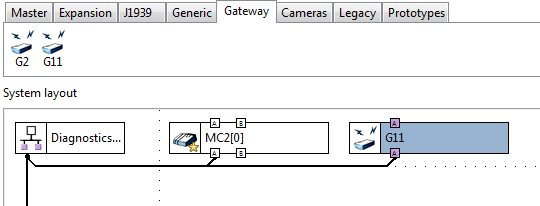

Image 298

Qcode improvements

Show most sever error as status on row.

Improve Qcode auto-completion.

Include Qcode instructions in channel hint when Qcode is selected


Camera

Added module for Generic camera as alternative to IQAN-SV.

Functionality similar to IQANdesign 3.x
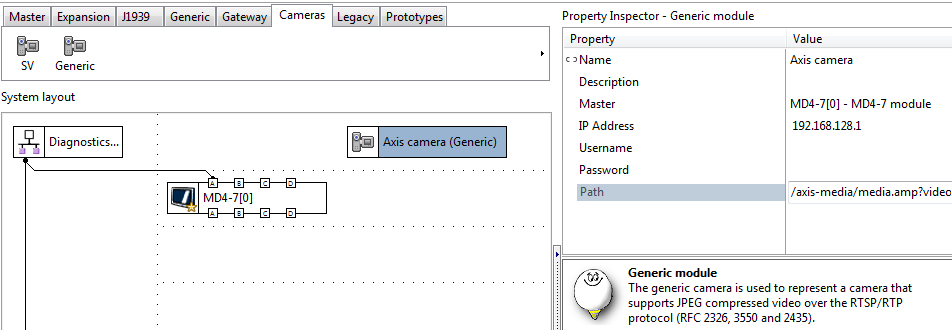
Image 299


Show unit on scaled max and scaled min

For VIN, PWMIN, FIN, DFIN, PCNT and DPCNT

Also added unit to reset value for MEM, TMR. PCNT, DPCNT
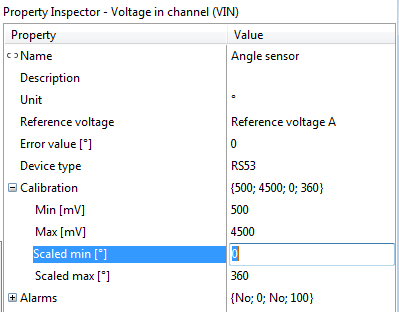
Image 300


New solution library examples

Added IQANdesign example files for:

  • Start button NO NC (both project file .ids4 and simulation file .isa4)
  • J1939 Fluid Property Sensor (FPS)
  • J1939 particle counter IPDR (iCount)

Added IQANscript example files for:

  • Get system info and clone (.iss4 script file, installs with IQANscript

+2
Completed

.DBC file import

Frederick Prigge 12 years ago in IQANdesign updated by Gustav Widén (System support) 4 years ago 16

It would be fantastic to have a script to import .DBC files that would generate automatically the GFIN/JFIN GFOUT/JFOUT as well as the associated JPIN/GPIN JPOUT/GPOUT. That would literally save be weeks of typing and may mistakes!

+1

IQANdesign 7.06 released

Gustav Widén (System support) 6 days ago in IQANdesign updated by ksilovich yesterday at 4:21 a.m. 4

Updates for cyber security

This version introduces important updates preparing for IEC 62443 cyber security compliance on target modules.

Secure boot and secure update

IQAN-MD5, -MC4xFS, -MC4x, -XC4 firmware’s are now signed. 

Signed firmware is required for installing on modules produced with secure boot.

IQAN-MD5 displays, -MC4xFS-M24 and -MC4x-M24 controllers, and -XC4x-M24 expansions will be produced with secure boot starting in 2026. Modules produced with secure boot will thus have 7.06 as minimum version (changing from 7.02 on MD5 and 7.03 on C4x-M24)

IQAN-MD4 and original version of MC4xFS/MC4x/XC4x will continue to be produced with bootloaders supporting old versions. 

Major update of IQAN-MD5 firmware

MD5 firmware is restructured to strengthen cyber security and prepare for future improvements. When updating in the field, there are key points to be aware of.

  • Upgrade of MD5 to 7.06 requires 7.05 in module.
  • During update, all logs in the MD5 will be erased.
  • After updating MD5 to 7.06, downgrade is not possible.

Image 5294

Message when attempting to send 7.06 to  MD5 with version 7.02-7.04. 

Image 5293

Message about major upgrade of MD5 module , before sending 7.06

Project file size (.idax) increased to ~75 MB, to handle the update from 7.05 to 7.06. Clone files are smaller, ~30 MB.

Clones taken from MD5 7.06 or newer can only be sent to module with 7.06 or newer.

Image 5295

Message when trying to use clone to upgrade to 7.06 


Other changes


IQAN-MD5 performance enhancements

  • Reduced start-up time, time to show first display page reduced with ~1 second. 
  • Minimum application cycle time is reduced from 50 to 20 ms. The recommendation to use locate machine control functions on MC4 controllers remain. 

Always send firmware before application

If an update is interrupted while sending firmware, the module is now able to restart with the old application, matching the old firmware. This reduces the risk of not having a working application if a version update is interrupted. As before the firmware is double stored, an IQAN module will always have a working firmware. 

More details in Release notes
Release notes - IQANdesign 7
Release notes - IQANsimulate 7
Release notes - IQANrun 7
Release notes - IQANscript 7

+1

Scrolling in User Interface

Marnix 3 months ago in IQANdesign updated by Leighton 1 day ago 6

Hello, 

We are experiencing a user interface issue in Iqan Design 7.05.19.10562.

When editing a page on the display and scrolling in the Layers panel (for example towards the bottom), the main screen keeps scrolling along with it.
Even though the mouse cursor is positioned in the layer navigator, the display view continues to move.

This makes working quite difficult. Ideally, the scroll action should only affect the area where the mouse cursor is located, and the display view should remain in its current position.

Has anyone encountered this behavior before, or is there a setting to prevent the screen from scrolling together with the layer panel?

Thanks.

+1

Application Migration From MD-4(7) to MD5(8).

Amin Syed 3 months ago in IQANdesign updated by Gustav Widén (System support) 3 months ago 2

Application Migration From MD-4(7) to MD5(8).

1. How do I migrate a chunky application without having to lose connections to my I/O's that are present on separate Expansion modules but controlled by the head master MD4-(7) when I need to migrate the application from MD4-(7) to MD5-(8)?

2. How do I keep connections between adjustment groups, adjustment parameters, logs and Monitoring channels under the same transition?

3. Basically how can I completely migrate an application contained in an MD4-(7) screen to an MD5-(8) screen without loosing connections to other hardware in the System Layout if I am using a Variance file. 

The purpose is to have 2 selectable headmasters with complete application available on both.

+1

Looking for IQAN consultant to design/modify IQAN software

toddp 4 months ago in IQANdesign updated by Julian Robinson 4 months ago 6
+1

Exporting .dbc that includes CAN routing frames

Jordan Spencer 4 months ago in IQANdesign 0

Hello,

I am currently using IQANdesign 6.08. The system I am working on is a multi-master system, and I am sending information over CAN E (J1939) to a third-party PLC.

I am using CAN routing to add certain frames from other modules onto CAN E. When I create a DBC file for this bus, none of the CAN routing frames are included in the DBC file. Can you advise if there is a way to include these frames?

Thank you,

Jordan

+1

Delayed can connection during multimaster startup

Gerard Essink 5 months ago in IQANdesign 0

I have a system with a MD4-5 display and a MC43 controller in 1qanDesign 7.04. 

Between these two the master/diagnostics bus is connected via a wireless can repeater.

This works perfectly fine when the connection is established via the wireless repeaters. However when the modules statrtup together with the display, the display is started faster than the display, which causes no connection to the mc43 to be established even when the can connection is online.

If during startup the connection is online, but connection is lost and re-established, everything works fine.


I have already tried making the MC43 optional, but this didn't work.

There seems to be some check in the startup that causes this behaviour?

Is there any way to avoid this?

+1

Add object number of selected element to the status bar.

Matt 6 months ago in IQANdesign updated 5 months ago 6

Sometimes I find myself collaborating on a project with an engineer who is at a different location and have to test their program changes for them. It would be much easier to find a given channel or object that they are referring to if they could just give me an object number (which you can only find when doing a compare) for me to stick into the find window.


Can we get an item in the status bar next to the project name and version, which shows the number that would normally show up next to BEGIN or END in the project compare window?

Image 5110

+1
Answered

MC/XC4x Series Transition to M24

Justin Wagner 6 months ago in IQANdesign updated by Torbjörn Andreasson (Product manager) 6 months ago 3

I recently got an email notification that the MC/XC 4x series is being replaced by the M24 series controllers.

Is the non M24 series of controllers and expansion modules no longer available?

They claim to be compatible in form, fit, and function, but does the system have to be on IQANdesign V7.03 or higher to be able to swap a non M24 series controller with the new M24 controllers?

That is not ideal, as we have many systems out there with XC4x series expansion modules on V6-V7.02. Having to update master module programming to swap to the M24 series is not great and takes away one of the main advantages of the expansion modules (not having to update master module programming for field replacements). Especially since it can take a very long time to send projects that have different firmware than is on the master when using anything other than Ethernet.

Answer

This is correct that you'll need to have at least IQANedsign v7.03 to be able to add the IQAN-MC4x/IQAN-XC4x in your system. This is not optimal but the way needed to go with the new components in the IQAN-MC4x-M24/IQAN-XC4x-M24 variants.

The non M24 series is still available but since there is old components in them I would say that transitioning to the M24-version is something that's good to have done sooner than later.