
 Ability to Filter through multiple FMIs under a single SPN
Currently when a DM1 message is received where a single SPN has multiple FMIs (low, moderate, and severe warnings) the IQAN system will only show one FMI when the channel is referenced and it is usually not the most severe one.
The request is to add the ability to reference all the FMIs under the SPN channel and/or have the SPN channel show the most severe warning when multiple FMIs are present.
 4 byte JPOUT not functioning as expected.
I have seen a few posts on this issue, but did not see anything as far as a resolution or that it is being worked on. Given that the JPOUT channel has a 4 byte option and I didn't see anything in documentation in regards to special conditions for its use. The 4byte option does not function as I would expect on a JPOUT.
Encountered this on IQAN 4 when we wanted a quick a dirty re-transmit of a block of J1939 data.
There seems to be an issue with handling the LSB nibble. Also seems that I can't use the 2 MSB when other fields are set to 1. Not sure if this is due to error handling?
With a very simple function of a 'frame in' to 'parameter in' to 'parameter out' to 'frame out'. The simulation will not allow the parameter in to be filled with 1's. It does allow 0x3FFF FFF0.
On a system, the parameter in receives the expected value but when passed to the parameter out bits get truncated.
For example, sending 0x1F2 DBE0 is handled as expected by the JPIN but when passed to JPOUT the data is 0x1F2 DBD0. Placed real and int math channels in between the JPIN and JPOUT to verity the received value is being passed to other channels as expected, and it is. So the issue seems to be with the JPOUT.
This occurs on IQAN Design 4 as well as IQAN Design 7.

 No master CAN fault message
We have a system with MC43FS > MD5-10 > MC43FS layout. The MD5 display is central between the MC43's using the CAN in/out pins for connections. CAN terminations (software enabled) on both MC43 master and diagnostic busses (each MC43 module is end of line).
We had a fault where there was no comms on the master bus using APP IN/OUT between any of the 3 modules, just indicated red in IQAN design and state 'timeout' on the app in's. No error flash on the MC43 LED and no error message shown on the MD5.
We found that the master bus wired in the MD5 was the wrong way around (CAN high /CAN low incorrect), but it did not show this as an error, no logs suggested what the problem would be. I'm sure normally if this happens we get a bus error/ CAN fault shown on the screen, pointing us to where the problem may be, but this doesn't seem to have happened in our case. Could be helpful for future fault finding if it was available or showed a message?
IQAN Design 7.05.27.10982

PDF Viewer on MD5-5
Wondering if there is a method of displaying PDFs on an MD5-5. Currently in the process of migrating our OEM application over to the MD5-5 platform from an MD4-5 and found that when pressing on the text control buttons to display pdfs the MD5 System Message popup indicates PDF viewer not available.
Functions using a finite state machine dont change
I had an unnecessary state in a Finite state machine (state 15), so I deleted it. This resulted in all of the states > 15 to change to a state one lower (state 16-> state 15). But all of the functions that utilize this FSM did not change resulting in all of these functions being incorrect.

IQANdesign 7.06 released
Updates for cyber security
This version introduces important updates preparing for IEC 62443 cyber security compliance on target modules.
Secure boot and secure update
IQAN-MD5, -MC4xFS, -MC4x, -XC4 firmware’s are now signed.
Signed firmware is required for installing on modules produced with secure boot.
IQAN-MD5 displays, -MC4xFS-M24 and -MC4x-M24 controllers, and -XC4x-M24 expansions will be produced with secure boot starting in 2026. Modules produced with secure boot will thus have 7.06 as minimum version (changing from 7.02 on MD5 and 7.03 on C4x-M24)
IQAN-MD4 and original version of MC4xFS/MC4x/XC4x will continue to be produced with bootloaders supporting old versions.
Major update of IQAN-MD5 firmware
MD5 firmware is restructured to strengthen cyber security and prepare for future improvements. When updating in the field, there are key points to be aware of.
- Upgrade of MD5 to 7.06 requires 7.05 in module.
- During update, all logs in the MD5 will be erased.
- After updating MD5 to 7.06, downgrade is not possible.
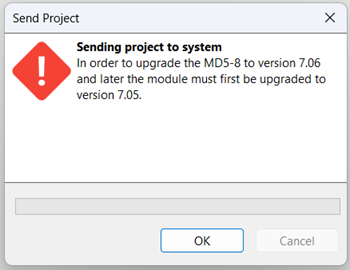
Message when attempting to send 7.06 to MD5 with version 7.02-7.04.
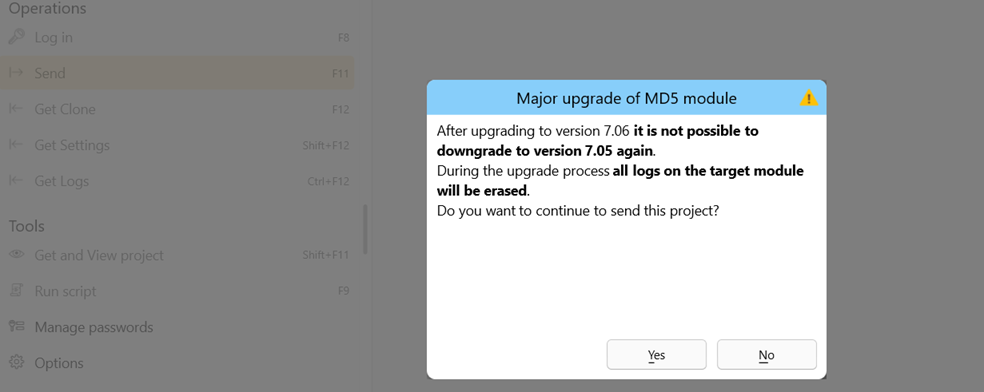
Message about major upgrade of MD5 module , before sending 7.06
Project file size (.idax) increased to ~75 MB, to handle the update from 7.05 to 7.06. Clone files are smaller, ~30 MB.
Clones taken from MD5 7.06 or newer can only be sent to module with 7.06 or newer.
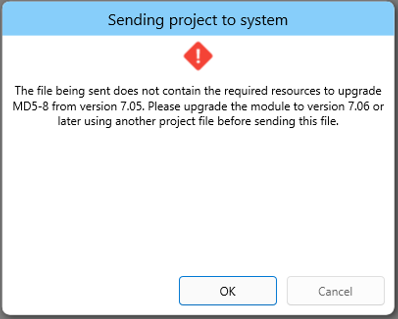
Message when trying to use clone to upgrade to 7.06
Other changes
IQAN-MD5 performance enhancements
- Reduced start-up time, time to show first display page reduced with ~1 second.
- Minimum application cycle time is reduced from 50 to 20 ms. The recommendation to use locate machine control functions on MC4 controllers remain.
Always send firmware before application
If an update is interrupted while sending firmware, the module is now able to restart with the old application, matching the old firmware. This reduces the risk of not having a working application if a version update is interrupted. As before the firmware is double stored, an IQAN module will always have a working firmware.
More details in Release notes
Release notes - IQANdesign 7
Release notes - IQANsimulate 7
Release notes - IQANrun 7
Release notes - IQANscript 7
Scrolling in User Interface
Hello,
We are experiencing a user interface issue in Iqan Design 7.05.19.10562.
When editing a page on the display and scrolling in the Layers panel (for example towards the bottom), the main screen keeps scrolling along with it.
Even though the mouse cursor is positioned in the layer navigator, the display view continues to move.
This makes working quite difficult. Ideally, the scroll action should only affect the area where the mouse cursor is located, and the display view should remain in its current position.
Has anyone encountered this behavior before, or is there a setting to prevent the screen from scrolling together with the layer panel?
Thanks.

Application Migration From MD-4(7) to MD5(8).
Application Migration From MD-4(7) to MD5(8).
1. How do I migrate a chunky application without having to lose connections to my I/O's that are present on separate Expansion modules but controlled by the head master MD4-(7) when I need to migrate the application from MD4-(7) to MD5-(8)?
2. How do I keep connections between adjustment groups, adjustment parameters, logs and Monitoring channels under the same transition?
3. Basically how can I completely migrate an application contained in an MD4-(7) screen to an MD5-(8) screen without loosing connections to other hardware in the System Layout if I am using a Variance file.
The purpose is to have 2 selectable headmasters with complete application available on both.


Delayed can connection during multimaster startup
I have a system with a MD4-5 display and a MC43 controller in 1qanDesign 7.04.
Between these two the master/diagnostics bus is connected via a wireless can repeater.
This works perfectly fine when the connection is established via the wireless repeaters. However when the modules statrtup together with the display, the display is started faster than the display, which causes no connection to the mc43 to be established even when the can connection is online.
If during startup the connection is online, but connection is lost and re-established, everything works fine.
I have already tried making the MC43 optional, but this didn't work.
There seems to be some check in the startup that causes this behaviour?
Is there any way to avoid this?
Customer support service by UserEcho


