
 SHOW VALUE AND STATE/MODE FOR VALUE CONTROLS
WHEN SELECTING WHAT TO SHOW IN THE VALUE CONTROL IT WOULD BE NICE TO SHOW THE STATE THAT THE MATH CHANNEL IS IN. THE REASON FOR THIS IS THE SAME AS THE REASON TO HAVE A MODE SELECTOR FOR THE VIN CHANNELS. THIS WOULD ALLOW YOU TO RUN A VIN INTO A MATH CHANNEL THAT HAS A MODE SELECTOR FOR UNITS IN THIS CASE. WHEN THE STATE IS SELECTED AND THE MATH HAS CHANGED THEN THE MODE/STATE IT IS IN CAN BE DISPLAYED AS THE UNIT NEXT TO THE VALUE.

 Bi-Directional vs Uni-directional Cout Saturation
In my fan system we have a gear pump feeding our fan valve which feeds a gear motor. The initial programmer had it set as "Bidirectional: YES" and the positive direction values were as follows:
Min Current: 605 mA
Max Current: 0 mA
Start slope/Stop slope: 250 ms
(The negative direction is just opposite of that, Min: 0, Max: 650)
The valve is programmed to open (allow the fan to go full on, therefore max oil flow) at 0 mA, and otherwise programmed to run according to the cooling demands. But there is no actual negative direction, it is a proportional valve, it's either (somewhat) open or closed so it's 0 to 650.
Sometimes when it's hot outside, the hydraulic oil gets hot and the coil (probably) heats up we get a "FAN SPEED COUT SATURATION" error a few seconds after starting up the machine again. I did some testing and found that if I eliminated the Bidirectional component and made it unidirectional that this problem goes away. It makes sense in my mind as the valve is proportional so why should the program ever look for a negative direction.
Does my logic make sense? Would you ever need a bidirectional Cout for a proportional valve?
Sorry for the long rambling post.

Sending project system failure
Hi this is my firs time and i have problem with sending.
in order to upgrade the md4-5 to version 4.00 and later the module must first be upgraded to at least version 3.17?
How i do this
My connektion is ethernet cable

Hi Kimmo,
Regarding the dialog saying that you need 3.17 or higher, there were preparations made starting in version 3 to be able to upgrade to version 4. To upgrade a module with a 3.16 or earlier version, you need to do it as a two stage process, first sending a blank 3.17, 3.18 or 3.18 to the MD4, and then sending the actual application in 4.00. All the blank file needs is the master module.

 Can't import IQAN2 function groups into IQAN4
I am very unhappy with the inability to import function groups from working IQAN2 code into IQAN4. Atlas Copco has spent multiple man year developing and testing their IQAN2 control applications. I want to be able to take advantage of this as we work towards updating their next gen rig to work under IQAN4. I know I could do this if I was coding in MatLab/SimuLink, C, or C++. I have tried exporting the function groups with references, and without, and all I ever get when I try to import them is the following:
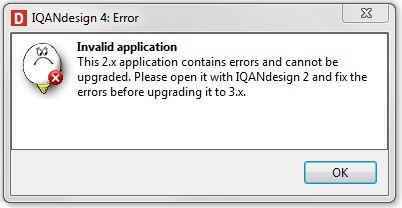
I am aware that the connections to the function group are going to be broken, and will need to be connected appropriately. I should not have to track these down and re-specify/reconnect these, in IQAN2 though, especially when I'm importing the function group from one type of module (MC2) to another (MC3).
By taking this approach IQAN makes code re-use almost impossible. I'm very disappointed
Please fix it.

IQAN Design Idea's
Some Ideas I have had,
1) It would be nice to justify a comment box to the right. It comes in handy when you want the text to be right next to that function.
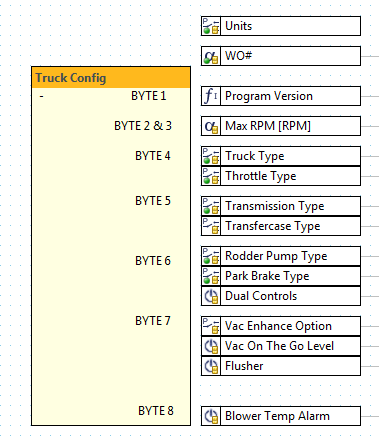
2) Error Value for a 2 bit value. It defaults to False, but it would be nice to be able to put (-1). That way in the program I an tell there is an error and do some other code with it.
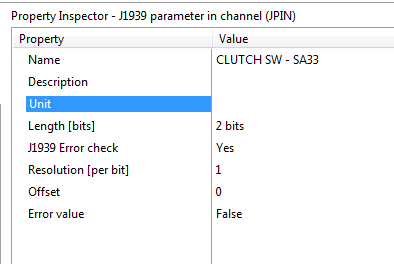
3) TSC1 SA - Integer Parameter. I saw a post a year ago about adding this to IQAN 4, but it has not been done yet. I was wondering if you knew when I could expect that.
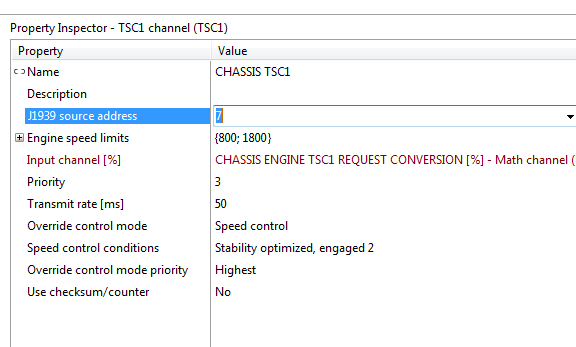
IQAN 4.03.27 - Qcode Errors
With the new Iqan 4.03.27, the qcode window now re-formats all my code if I try to add some code in it. I never had this issue with 4.02.
Example, I had a functional code, and went to add a variable at the top of the qcode, and it did this.


IQAN system communication with PLC over Ethernet or CAN
Has anyone had the need to communicate with Industrial PLC's? The Ethernet port would be the best way to do it if the MD4 could support Ethernet communications with the PLC. It is expensive to incorporate a CAN to Ethernet converter and also it adds another piece of hardware in teh system that you need to mount and support. Is there any plans to add Ethernet communication protocol to the MD4 (other than camera and PC communications?)
Along the same line, has anyone created an EDS document for the IQAN MD3 or MD4 that can be used to set up communications with the Alan Bradley PLC over CAN?

Expansion Bus and J1939 on the same bus CAN
It is possible to use tha same Bus Can for two different CAN systéme .
J1939 an Expansion on the BUS CAN C on the MD3
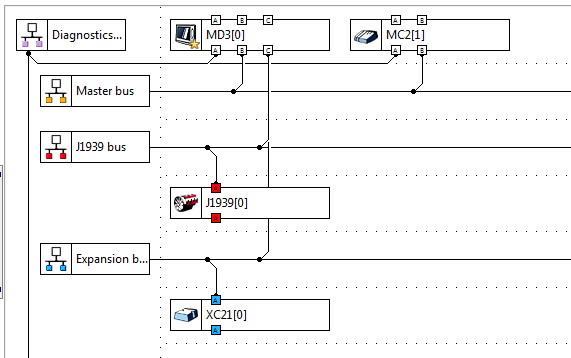
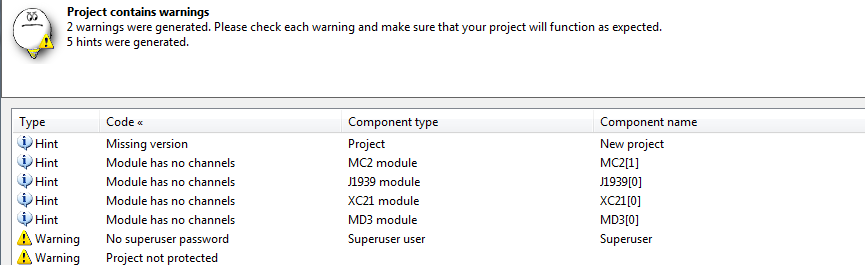
When I look the project check, I don't have error.
Best regards
Jean-Baptiste
RGDH
Develloper for IQan system
Hi, yes you can share J1939 and expansion Bus.
Only Generic CAN can't be mixed with the other protocols.
One thing to consider when you share a CAN-Bus line is the traffic load. You can measure it with IQAN analyze.

show only preferences from menu system
Is there a way to show only preferences (or other category of main menu) by pushing menu (or custom made) button?

Use application default value from a COUT in MAC
Hello,
I like to use the application default value, 'max current', of a COUT in a math channel. Is this possible? I don't want to use integer parameters because you loose the standard adjustable menu of the COUT channel.
Kind regards,
Robin
Customer support service by UserEcho


