
 Md4 and frequency
Hello
It is possible to measure a frequency with a md4 ?
Thank

 360° Rotation of Gauges
I have an application where I am using a gauge to display the position of a rotating object. I make the 12 o'clock position the 0° point. I noticed that as my input is rotating from clockwise, that the needle on the gauge rotates counter clockwise from 359° back to 0°.
It would be nice to have the gauge continue to rotate in a clockwise direction as my input crosses the 0° threshold.
Slow start IQAN-SV
Hi everyone,
I have a concern regarding IQAN-SV cameras.Our client has two working machines (not new) on one, cameras are booting up quickly. However, on the other one, the cameras' boot is pretty slow. He tried swapping cameras/cables without any effect. Has anyone run into this kind of issue before ?

Long-Term Fluid Level Averaging
Based on the IQAN Filter function documentation, it appears the standard Filter is intended for fast signal stabilization and its response depends on cycle time and filter percentage. For a fluid level application, we need to average the level over approximately 6 minutes to reduce false low-level readings while traveling on long ramps. Is the standard Filter function suitable for this kind of long averaging period, or would it be better to implement a custom moving average using sampled values stored in an array/buffer? For example, capturing one filtered level value every 72 seconds and averaging the last 5 samples to achieve an approximate 6-minute average.

True RMS statistic in IQANrun
Hi,
I have logged some hours of machine data. Using a measure group with all relevant signals, I logged them while connected to the machine in IQANrun and saved as .irmx.
In IQANdesign, there are a number of statistics under each measure group: Min, Max, Mean, Peak-to-peak, and True RMS.
In IQANrun, when looking at a recorded .irmx most of these statistics are there, but not True RMS.
Is there a way to add/change the statistics which are shown in the statistics box in IQANrun? Or is it somehow possible to analyze the .irmx in IQANdesign where the True RMS statistic is available?

ID tag
I have an MC42 with ID tag #3 displaying fault 3 red 2 yellow. ID tag was replaced due to 1.74k ohm resistance check, specification is 1.5 k ohms but Its still flashing the same error. Is there a way to test the MC42 address tag circuit for diagnostics of a faulty MC42?

i need to install iqan run 7 on my new laptop. i am using the license key i received years ago to start working on my new laptop, but this doesn't work. what can i do to make Iqan Run 7 work again? . best regards Alwin B
i need to install iqan run 7 on my new laptop.
i am using the license key i received years ago to start working on my new laptop, but this doesn't work.
what can i do to make Iqan Run 7 work again? .
MC4X PWM LS Connection Only
I was wondering if its possible to drive an PWM output (snippet below) only through the PWM LS?
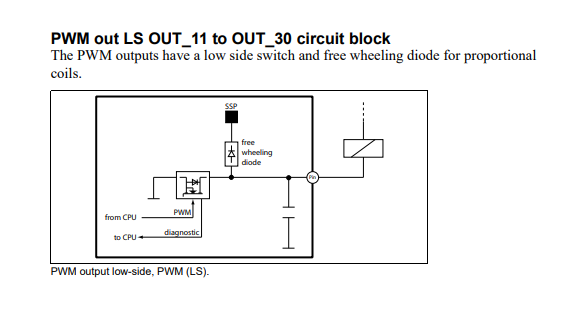
So for example can i use PWM HS+LS C1:14/C1:39 but leave the HS disconnected and just drive through the LS (C1:39) since current is around 40mA?



System messages font size
Is it possible to change the font size in system dialog boxes (CMSG, IMSG, sytem messages)?
Adjusting "tiny" and "small" font size at display page container does change this.
Customer support service by UserEcho


