
 md4-5 firmware 6 to firmware 4 update
I have a MD4-5 master display that is blank with firmware version 6 but the IQAN program for it is IQAN 4.06. I need to back update the firmware to version 4 to be able to program it with the program.
 QCode Documentation
Does Parker provide documentation for the code syntax used in QCode?. I normally just guess and let the assistant complete things for me. It would be nice to have documentation the lays out and explains all of the options. Thank you

 Phantom Instruction in calculation order window
While manually ordering the calculation order in a module, I noticed that we had an extra module added. See attach Screenshot. 10 element to sort out for only 9 in the window. Seem to appear after moving the first element.
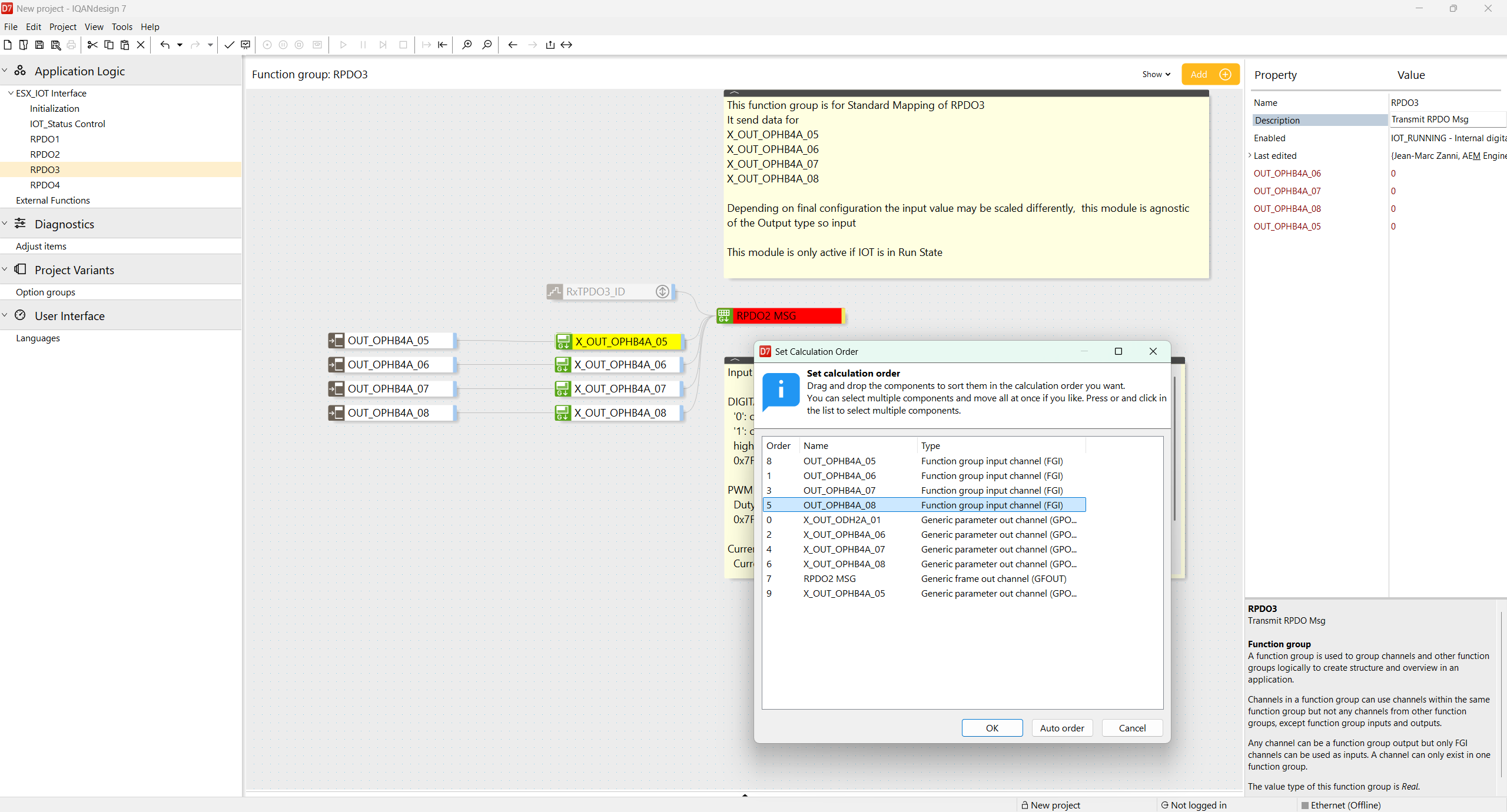
Functionally does not seem to matter.
May be the reference to a Global variable causes the issue?
this happened while creating a new External module.

Long-Term Fluid Level Averaging
Based on the IQAN Filter function documentation, it appears the standard Filter is intended for fast signal stabilization and its response depends on cycle time and filter percentage. For a fluid level application, we need to average the level over approximately 6 minutes to reduce false low-level readings while traveling on long ramps. Is the standard Filter function suitable for this kind of long averaging period, or would it be better to implement a custom moving average using sampled values stored in an array/buffer? For example, capturing one filtered level value every 72 seconds and averaging the last 5 samples to achieve an approximate 6-minute average.

True RMS statistic in IQANrun
Hi,
I have logged some hours of machine data. Using a measure group with all relevant signals, I logged them while connected to the machine in IQANrun and saved as .irmx.
In IQANdesign, there are a number of statistics under each measure group: Min, Max, Mean, Peak-to-peak, and True RMS.
In IQANrun, when looking at a recorded .irmx most of these statistics are there, but not True RMS.
Is there a way to add/change the statistics which are shown in the statistics box in IQANrun? Or is it somehow possible to analyze the .irmx in IQANdesign where the True RMS statistic is available?

ID tag
I have an MC42 with ID tag #3 displaying fault 3 red 2 yellow. ID tag was replaced due to 1.74k ohm resistance check, specification is 1.5 k ohms but Its still flashing the same error. Is there a way to test the MC42 address tag circuit for diagnostics of a faulty MC42?

i need to install iqan run 7 on my new laptop. i am using the license key i received years ago to start working on my new laptop, but this doesn't work. what can i do to make Iqan Run 7 work again? . best regards Alwin B
i need to install iqan run 7 on my new laptop.
i am using the license key i received years ago to start working on my new laptop, but this doesn't work.
what can i do to make Iqan Run 7 work again? .
MC4X PWM LS Connection Only
I was wondering if its possible to drive an PWM output (snippet below) only through the PWM LS?
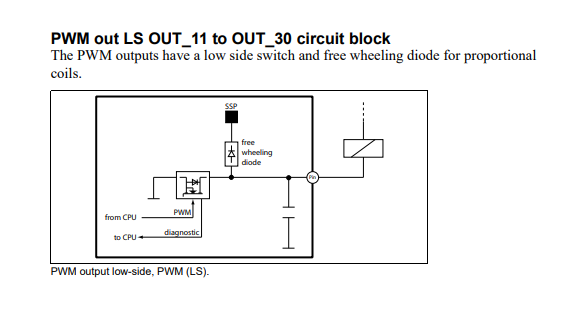
So for example can i use PWM HS+LS C1:14/C1:39 but leave the HS disconnected and just drive through the LS (C1:39) since current is around 40mA?


System messages font size
Is it possible to change the font size in system dialog boxes (CMSG, IMSG, sytem messages)?
Adjusting "tiny" and "small" font size at display page container does change this.
Customer support service by UserEcho


