
 Idea : New math function
Dear
I will be greate to :
- add an option on the round math function, by default it is half. But if you need the whole part you cannot. Exemple 5,4 -> 5, 5,8->5 (it is the int() function). (type of rounding : https://en.wikipedia.org/wiki/Rounding)
- add latchtime fonction. instead to use an separate IDC with delay On and Off, an function like this latchtime(input chanel, delay on, delay off), can be greate to simplify the code.
- add hysteresis function, hysteresis(input chanel, switch on if sup, switch off if under).
Regards

IQANdesign 4.07.14
IQANdesign 4.07.14 is now available on check for updates, see release notes:
http://divapps.parker.com/divapps/iqan/Downloads/IQANdesign%204/ReleaseNotes4.07.14.htm
The version 4.07.14 is containing updates for all master modules.

 Master bus connection distance
Hi forum users,
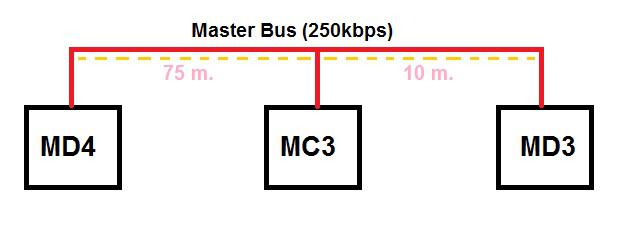
I have a project. I want to make connection like this.
Is there any problem ( connection interrupt , data loss etc.) if I make the connection as in the picture?
Should I change the communication speed?
m=meter.
Thank you for your help.
Regards. :)

Adjust SPN 3350 (TSC1 control purpose)
Is there a way to adjust SPN 3350 of the TSC1 control in IQAN or will I need to build my CAN message manually to accomplish this? It looks like it defaults to 31 and I need it to be 2.

 Start up MD4 and showing start display with delay when language is Japanese
When an application is loaded/started with a MD4 as master, and the display language is Japanese. After start up the display remains black for 10 seconds. Then the start display appears. When english is the choosen language, there is no time between start up the application and showing the display page. For a user it is as the display of the MD4 is broken when showing the display page is taken so long.

Invalid Reference Error?
Hello,
I recently came across an "Invalid Reference" error in a FSM channel. I reviewed the contents of the states and the transitions between them and I didn't find anything that stands out as abnormal. This is the first time I have come accross an Invalid Reference error and I cannot identify the source. Could you please advise?
Thanking you,
Best Regards,
Nico

Life expectency of iQan product line ? MD4/MC3x for example
Hi all,
I'm looking to find the normal operation life of iQan products.
For example, the MC3x and more specifically, the MD4 backlight.
Someone have an idea where I can find this information?
Thanks,
David

Digital Parameter in a Text/custom Button
It would be nice to be able to use a Digital Parameter (Adjust Item) in a Text or Custom button and not have to have it open to a the menu page. Treat it like a Toggled Vdin.

Better Software upgrade method
I have been a long time user of your product since Version 2.0. One of the thing I like is your constant search for improvement in your package. This also means that we have about once a month to update our software. Since I have 3 machines, That is 3 time 3 updates(Design/Simulate/Run). It is a bit time consuming and labor intensive.
Since we have now cloud based storage with local copy at least I do not have to suffer the Download time.
If I go to the forum, I can download a Complete package, but when I use the software update it only downloads the specific package. But I do not seem to find a method to access the specific package download page. Both Forum and Website direct us to the Complete package.
It would be nice to:
1) have access to a page to download the specific package. For Example, this morning I had just upgraded my field laptop to Iqan Design 4.07. I have to open the other two packages to download run and simulate. Downloading the complete package is counter productive since I have to re-enter the license number(I think?) but most specifically I have already use my
2) Instead of only upgrading the specific package may be the upgrade function could automatically offer to download the other package depending on your license type. alternatively this could be an offer to download the complete package if I do not have to re-enter the license again.
Once again this is only a suggestion and certainly not in the must have category. I will continue to upgrade because I know I can trust your product and want to make sure I have access to the latest and greatest.
Thanks,
JMarc

ascii characters from J1939 parameter
I have a J1939 message that transmits 8 ascii characters. I would like to display those characters as text on an MD4 screen.
Is there a way to convert a sequence of J1939 parameter ins to ascii characters to show in via a text parameter?
Customer support service by UserEcho


