
 Transparent Buttons showing black on MD4
Hi there!
I have encountered a problem using transparent buttons on a MD4-5. I use a lot of transparent buttons the build up the display pages. This by using transparent PNG's in the resolution i need them to be on the MD4-5. The problem is only when using smaller PNG's for smaller buttons.
For example the following pictures.
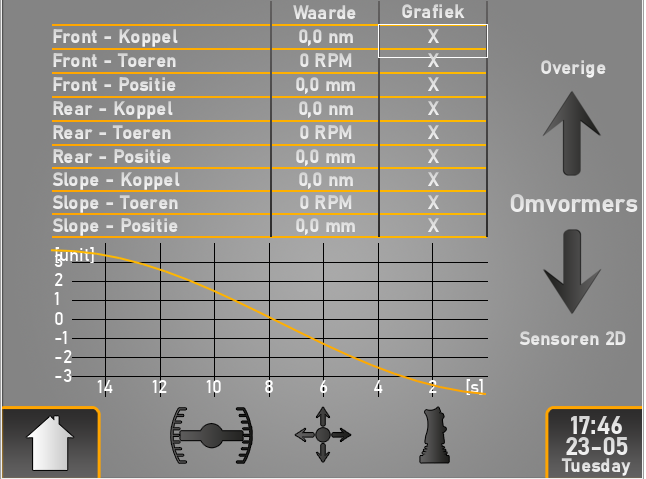
-The first picture is a screenshot from IQANdesign with a highlighted "PNG Button". This button has a resolution of 108x24px. There are more "PNG buttons" on this page for example the home button. This one with a resolution of 94x68px. But also the arrows, date and time and the quick menu buttons are all transparent buttons.
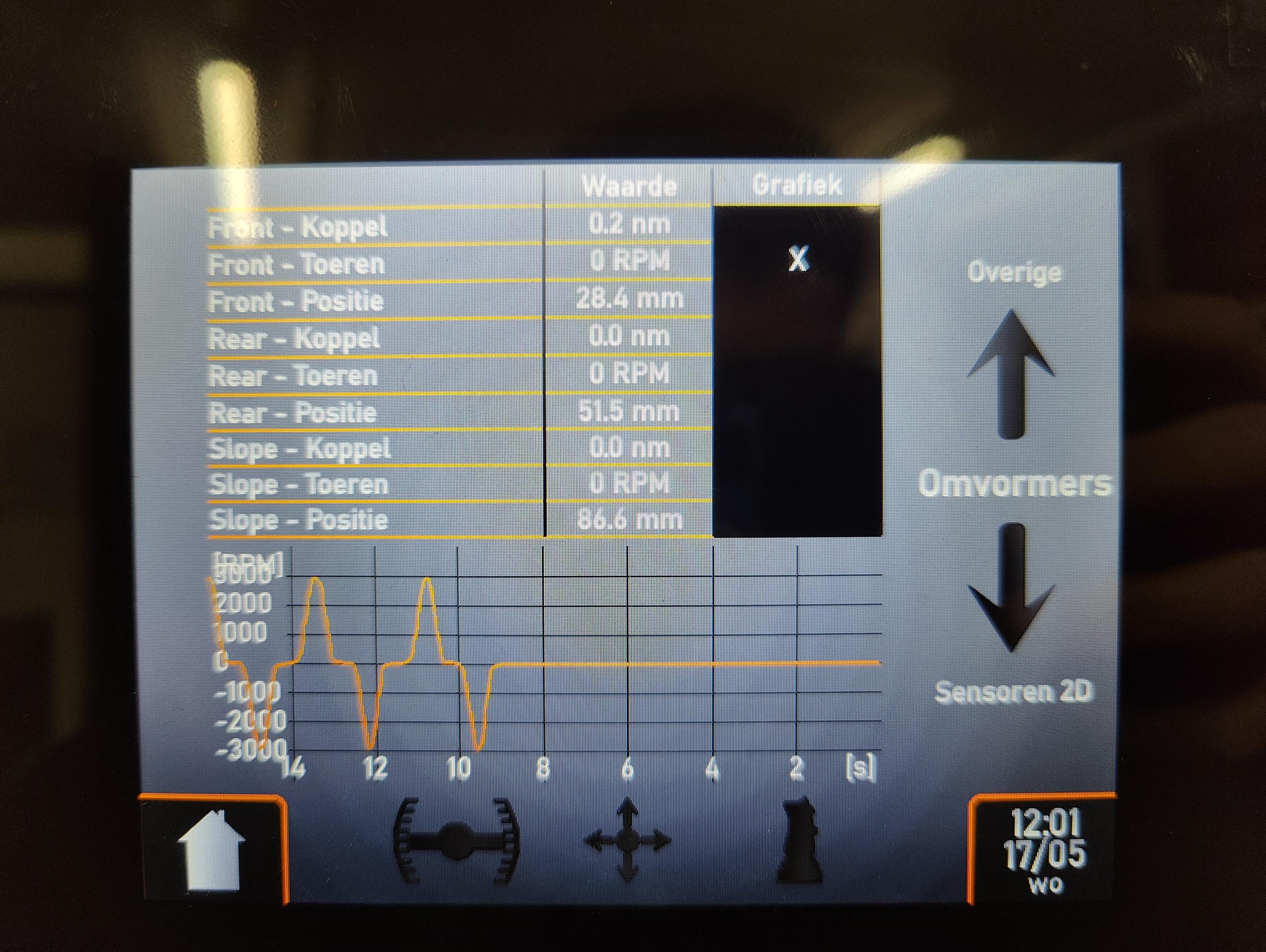
-The second picture is a photo of the same page on the MD4-5, showing that the smaller buttons all turned black. the larger button stayed transparent.
Is there any way to solve this issue, apart from placing bigger buttons?
Accuracy of trigonometric functions
Hi there!
I have a question about the accuracy of triangulation calculation. A common math operator I use is "tan". I use this for calculating the slope [%] from the angle of inclination [°]. This has always worked fine for me but now I need a higher accuracy.
The Qcode I use in a math component:
Result:= tan(Angle)*100
Where:
Angle is in [°]
Result is in [%]
The result jumps from 0% to 0.17%. I would like to see an accuracy of 0.01%. Is there any other way to achieve this? Using sin/cos gave me the same results.
I have a Gyroscope Angle sensor with an accuracy of .01°. So the problem isn't the measuring.
Thanks in advance
Theleo De Bruyn

Character limit on message box
We want to display a message on screen showing basic operation as soon as the display is powered up. There seems to be a limit of 299 characters, is there any way of removing it? If not can it be added to a wishlist for a future update please? I can understand you would scroll several times if the message box was small but we have widened it up significantly from default, and 299 characters isn't enough to populate the message box.
We have got around it by showing a separate screen with lines of text, but its easier if we use the built in message box.
 MD4-10 Blue screen after 25 minutes?
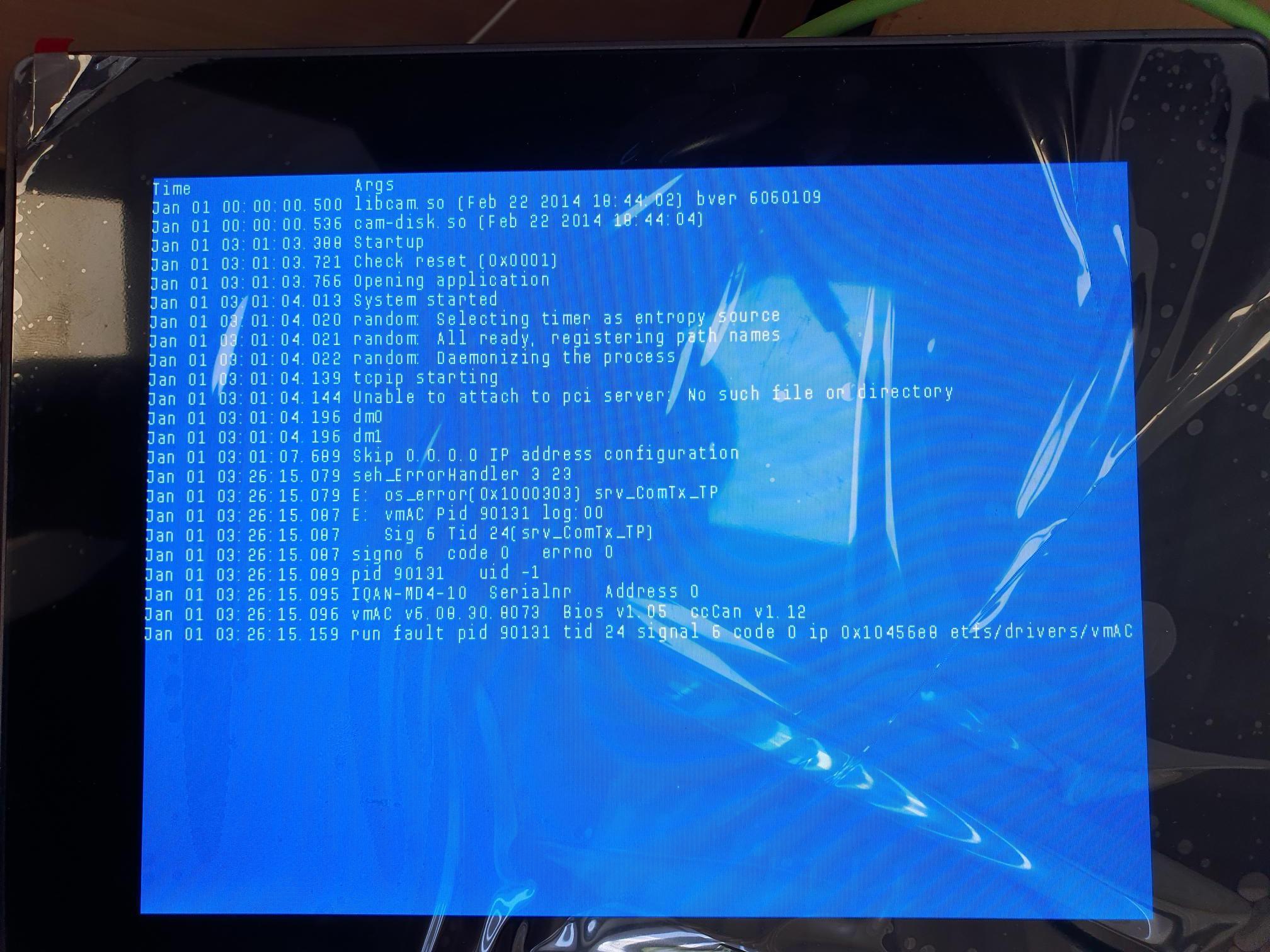
Updated a system (1x MD4-10 and 1x MD4-7) from Version 4.07 to 6.08 and had it running for around 25 minutes after the update and the 10 inch screen turned blue with the following details.
Can anyone shed any light as to what the fault is please? The MD4-7 appears fine, no blue screen.

set parameters on IQANrun not adjustable
I am having an error while running a script on IQAN Run. "set parameter" from the script has an internal error that shows when running from IQANscript and IQANrun states "Failed to adjust the parameter. The parameter is not adjustable." this is happening for 3 adjust items and the rest have no issue. however when I "retry" it successfully adjusts this parameter but it takes multiple retries. once the first parameter is able to be adjusted the other 2 have no error when adjusted. I am running this from a command line prompt, but the issue happens if using the script function on IQANrun or running it from IQANscript.

MC43FS upgrade fails with traffic on separate CAN bus
I have diagnostic bus on MC43FS CAN B connected to MD4
There are CANopen devices on MC43FS CAN C
IQANdesign is connected to MD4 via Ethernet
After upgrading of MD4 is complete it shows "Routing to MC43"
At this moment MC43 starts blinking long yellow + 2 short yellow "No application available"
Rebooting shows the same blink code and MD4 then shows application mismatch
Only way to make upgrade work is disconnecting CAN C.
I have uploaded CAN log from CAN C to filedrop.
Bus load on diagnostic/master bus 20-25%
Bus load on CAN C 30-35%

MD3 problems (version 2.x application)
Hi guys,
1. Customer has faulty MD3 (installed 2009)
2. I have clone file (irc) together with settings (irs) for this application I can open both in IQANRun 2.63
3. Got new MD3 (shows version 4.07.13.3815 pn 200777793 sn 312040107), Information on this forum that MD3-M15 indicates that 2.63 should be OK to load.
4. When trying to load into new (using IQANRun 2.63) MD3 got the message
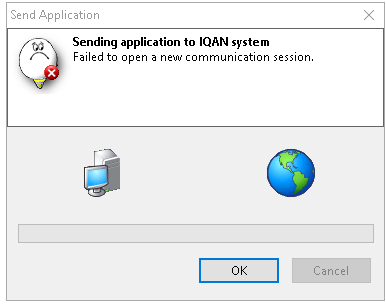
Any suggestion to solve it and supply customer with fully functional MD3
Thanks in advance
Kind regards,
Richard Kowalczyk MIEAust CPEng(Ret)
RKad Engineering
32 Kingussie Ave
Castle Hill NSW 2154
Australia
📲 :+61 (0)431 639 295

Event Logs not properly saving value log items when when the log is being viewed in MD4
I've noticed that if a new "value log item" is triggered while I have that log opened in the MD4 menu, the value that is recorded is the wrong value. Rather than record the channel's value when the event occurs, it records the channel's value when I close the log. Is this the intended behavior for logs or is this a bug?
I notice this in a program made in IQANdesign 6.08.25.8210.

IQAN TALK_GET application ERROR
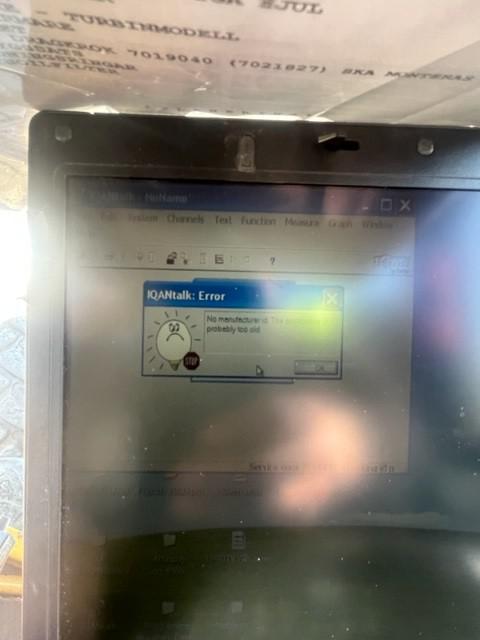
Hello all,
Back in the history 😊 IQAN TALK !
IQAN DG screen was in German and the MENU button was not working so I could not access any menus or change the languages
I managed to repair it (dirt on the PCB card) and all buttons are working now, I changed the language to ENGLISH and been able to understand the error message on the screen “Release Joystick”
Joystick rubber boots are not in really good shape so first thing is to set up new one if it’s still available, I am looking at it
I can also offer the customer a repair on his JS but in between I would like to increase the deadband with IQAN TALK software
I connect my laptop, managed to get connection on COM PORT 3 but when I tried to GET the application , that message pop up:
No manufacturer ID, this application probably too old
I have connect many machine of that age with IQAN TALK and never had any problem of communication
What do you thing, have you seen that before?
Br
/Adrien

Calculation Overflow in Math Channel
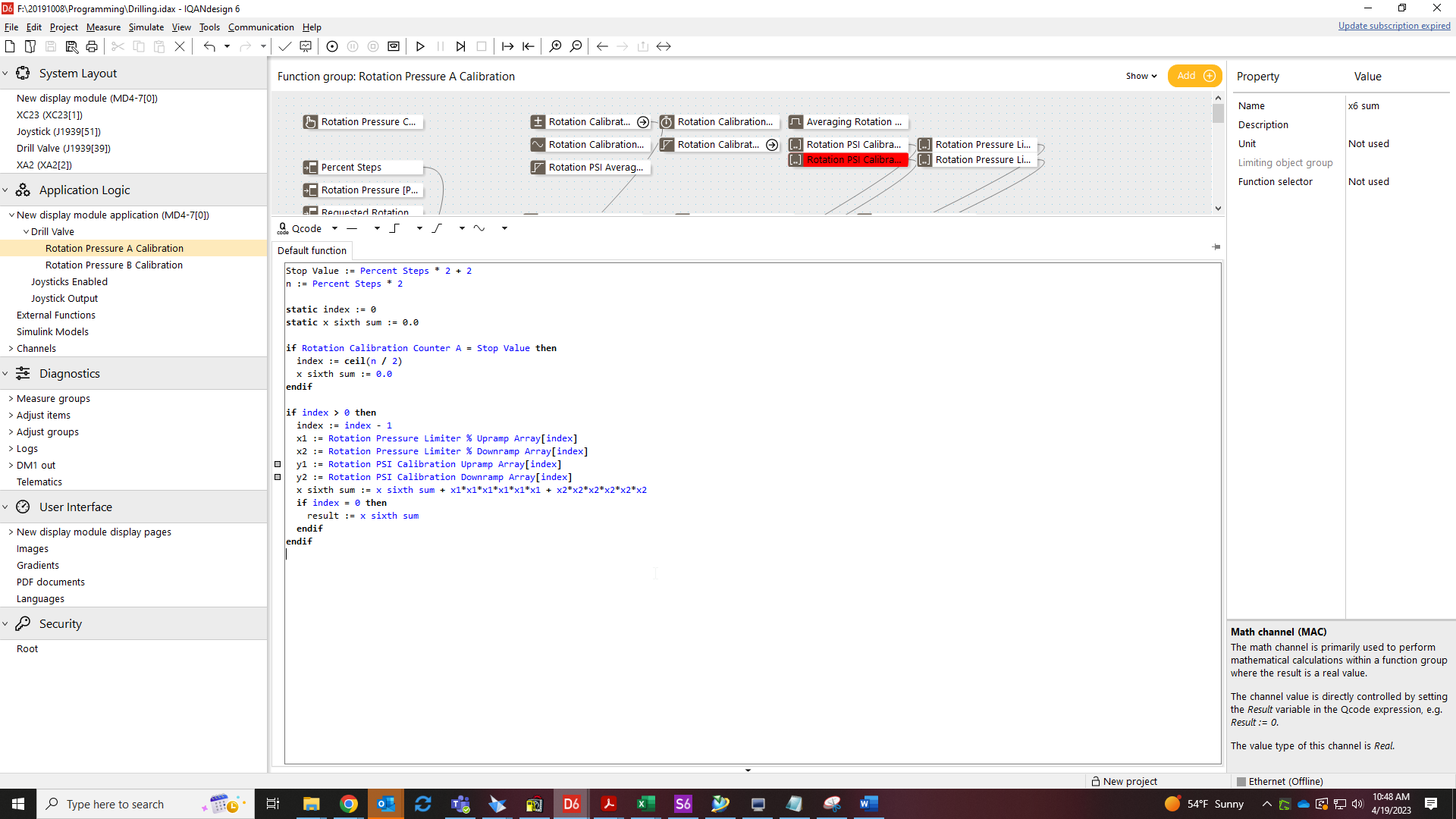
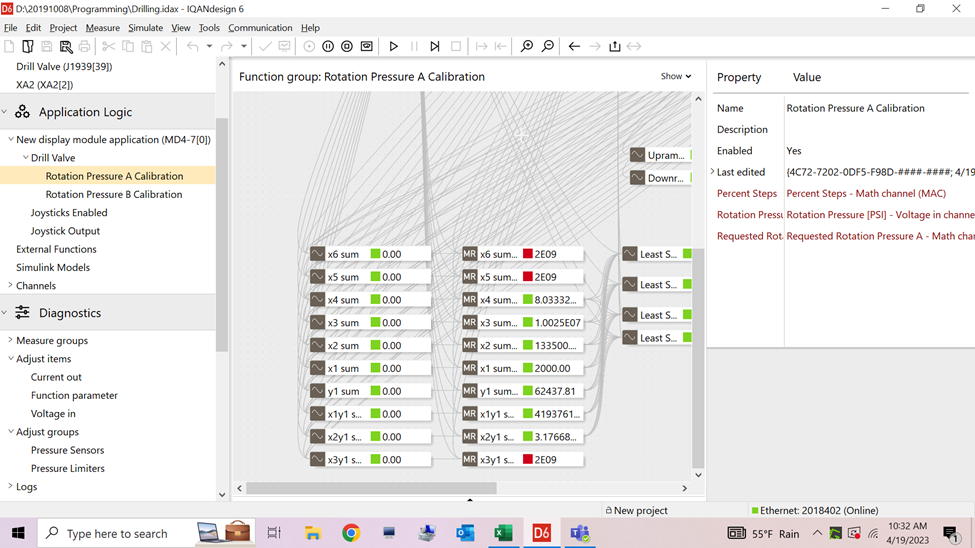
I'm trying to use a math channel to do some higher value calculations. I keep getting a calculation overflow error and it returns a value of 2E09. I'm assume this is the maximum value for an integer. But with a real value, the maximum value should be much higher than this. I would think that I should be getting a real value instead of an integer value. Is there a way to ensure I'm getting a real value? Or is something else going on entirely?
Customer support service by UserEcho


