
MD4 Temperature Test
Last monday, we did MD4 temperature test. MD4 waited at -33°C for 4 hours in a closed enviroment. After 4 hours, Power on MD4 7" touch panel and We tested digital in, digital out, canbus channel, touch screen. Resault we are fine. We didnt have a problem. My hand just froze when testing :)

 Analog Input - Temperature Sensor
The question is if any of you have used a temperature sensor in the analog input of a MD4-7? Was it PTC or NTC? Because in pdf only talks about connect a PTC sensor with a pull-up resistor. Kind regards. Diego.

IP camera with external 12/24VDC supply.
Do anyone have a good suggestion of a IP camera for MD4 that have external 12 or 24VDC power supply? Most of the cameras I've seen only have POE and a POE injector just ad up a lot of cost.
Of course rugged design for mobile application would also be a benefit.
Regards / Niklas

USB Driver error on new Windows 11 PC
I have a new windows 11 PC, I support many legacy IQAN systems and install all versions of IQAN design on my Laptop. I cannot communicate with systems via USB.
carefully read this article "https://forum.iqan.se/knowledge-bases/2/articles/236-usb-no-valid-license-or-incorrect-version" and i do indeed have the correct driver. but in device manager I get this error.
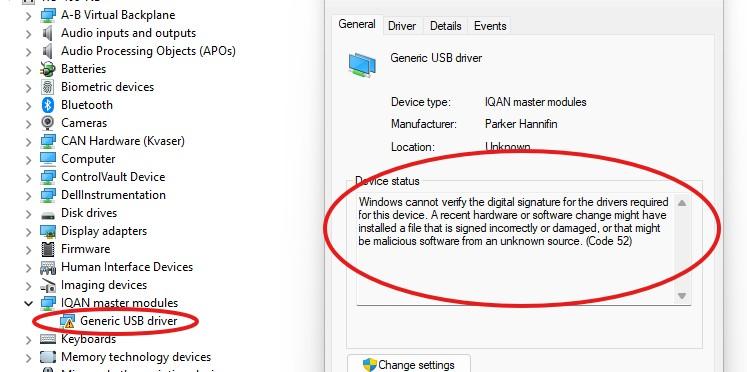
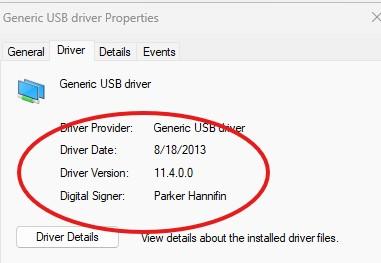
Windows cannot verify the digital signature for the drivers required for this device. A recent hardware or software change might have installed a file that is signed incorrectly or damaged, or that might be malicious software from an unknown source. (Code 52)
I have the identical set up on my old laptop and it has the identical driver but with no error
any suggestions on how to fix this?

TVS-diodes: To be or not to be
Hello,
I have a question regarding coils for proportional valves controlled by uni- or bidirectional COUT outputs:
As of now, we are using the coil "Sun Hydraulics 770-924" for some of our proportional valves. That coil includes a TVS-diode:
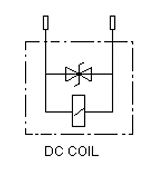
That contradicts the (somewhat loose?) statement in the MC4x Instruction book:

I understand that there is some kind of diode solution internally in the MC4x for COUT's. Does that solution make the coil's diode solution redundant?
Some information regarding the coil:
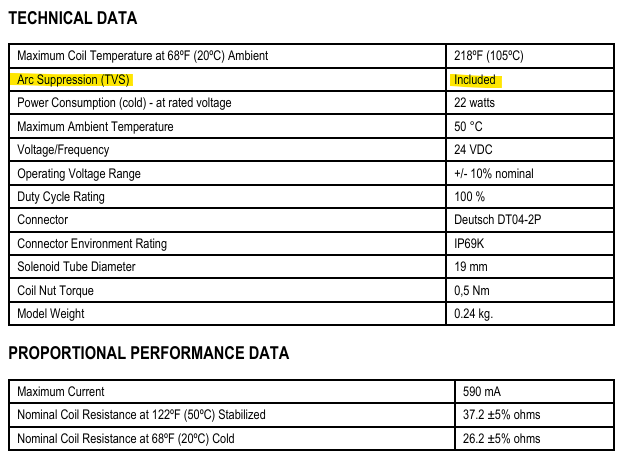
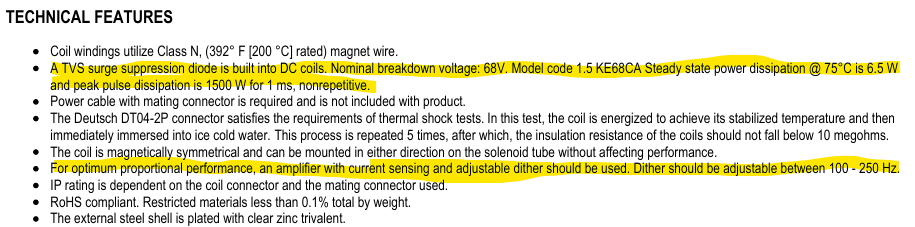
The coil _appears_ to work just fine in our application but I haven't checked it with an oscilloscope during operation to see what is actually going on. Maybe the TVS-diode in the coil is never active?
In short:
Is it OK to use this coil or does it, in some way, interfere with functionality? Or should I interpret the Instruction Book strictly and use a coil with no diodes at all?
I thought that with your knowledge of the MC43's internal hardware perhaps you could shine some light on the matter?
Much appreciated,
Christopher Fridstaden

Xt2 no enciende led ambar
Buenas tardes soy de argentina tengo una máquina con mdm xs xt2 y xp2 no me enciende la luz de status pero si la luz de verde me podrían ayuda por favor ya el el segundo modulo que me hace eso y no logro que funcione gracias

PWM IN MC43, Signal Conversion
Controller: IQAN-MC43, Connector C1, Pin 12 (IN_34, pull-up type frequency input)
Issue: I'm feeding a 200 Hz, ~60% duty cycle open-collector signal into pin 12, using the module's internal pull-up (per manual: 1.5 kΩ to internal 5V, 10 nF) with no external resistor. Instead of a clean square wave, the signal reads as a sawtooth that never reaches 0V - high sits around 4.6V, low only drops to ~4.3V.
I've confirmed pin 12 floats at 4.6V unloaded, and leakage from my circuit is negligible. Tried several pull-up configurations externally; sink current into the pin stays very low (~0.2-0.5 mA) regardless.
Questions:
1. Is 1.5 kΩ/10 nF correct for this input type?
2. What sink current is needed to reliably trigger a logic-low on this pin?
3. Any recommended interfacing for low-current-sinking sources on these inputs?
Thanks for any guidance.

XC43 Magnetoresistive Transmission Speed Sensor Integration
Hi,
Our transmission manufacturer uses a 2-pin magnetoresistive (MR) speed sensor. The output is 7 mA for low signal and 14 mA for high signal.
The frequency range would be 0-1500 Hz.
Given that FIN is looking for <1V low and >4V high on an XC43, we can't condition the signal with a simple current-sense resistor.
Do you have any suggestions on how to integrate this type of sensor into a XC43 module?

MD4-5,XA2,XC42 "No contact Error"
Recently we encountering "No Contact Error" in our system, but we found out that the cause of the problem is when the XA2 unit temperature goes to 42-46 degree it creates no contact error, but my question is, why it is happening if the operating temperature of the XA2 is up to 70 degree Celsius. I check on Diagnostic, Voltage are okay, Status okay, Address okay, only that the temperature is high.

Dither frequency with MC4x controller for hydrostatic pump application.
I have a project where we want to drive some hydrostatic pumps with current outputs on an MC4x controller, but the pump manufacturer's recommended control characteristics aren't available with the MC4x. This project had been working using an MD3 and several XT2 expansion modules, but these are both obsolete.
The pump manufacturer recommends 35 Hz, but the MC4x only has 71 Hz and higher available. (the pump manufacturer also recommends the dither amplitude be set 125 mA, and that is no longer controllable at all)
So my question is:
1. Is there a way to make this work with 71 Hz? Is setting the frequency to just over double recommended going to work?
Customer support service by UserEcho


